


Table of Contents
You want more organic traffic. You’ve heard keyword research is the foundation. But when you open up tools, you’re hit with jargon, price tags, and confusing dashboards.
Here’s the good news: Google Keyword Planner is completely free, backed by Google’s own search data, and more powerful than most people realize — especially for SEO.
At The SEO Byte, the best SEO company in Agra, we use the Google Keyword Planner tool every single week to uncover keyword opportunities, analyze search demand, and build content strategies that actually rank.
In this guide, we’re pulling back the curtain and showing you everything.
Whether you’re a local business in Mumbai, a startup in Bangalore, a blogger in Delhi, or an e-commerce brand targeting pan-India customers — this guide gives you the exact framework to use the keyword planner like a pro.
Want us to handle your keyword research? Get a Free SEO Audit from The SEO Byte team.
What Is Google Keyword Planner?
The Google Keyword Planner is a free research tool built into Google Ads (formerly known as Google AdWords). It was originally designed to help advertisers find keywords to bid on. But savvy SEO professionals — including our team at The SEO Byte — have long used the Google Ads Keyword Planner to fuel organic search strategies as well.
Think of it as Google handing you a window into its own search brain. When you run a Google keyword search through this tool, you’re getting data pulled directly from Google’s search index — monthly search volumes, competition levels, bid estimates, and hundreds of related keyword ideas.
The AdWords Keyword Planner (now rebranded as part of the Google Ads ecosystem) offers two core features:
Why Use Google Keyword Planner for SEO?
A fair question. There are dozens of keyword tools out there. So why should you use Google Keyword Planner for SEO specifically?
Because the data comes straight from Google.
Unlike third-party tools that estimate search volumes through panel data or click-stream analysis, the Google Keyword Planner tool pulls directly from what people are actually searching on Google. You can’t get more authoritative than that.
Here’s what makes it particularly powerful for SEO:
- Uncover long-tail keywords with lower competition that are perfect for newer sites.
- Identify seasonal trends so you can time your content publishing calendar strategically.
- Understand commercial intent using bid data — high CPC keywords often convert better.
- Map out your content clusters by grouping related Google keywords into topic themes.
- Find local keyword variations — essential if you serve customers in specific cities like Chennai, Pune, or Hyderabad.
Use the Google Keyword Planner to build your primary keyword list, then validate and expand it with tools like Google Search Console and Google Trends. This three-tool combo gives you the most complete picture of search demand for any topic.
Pro Tip from The SEO Byte
How to Access the Google Keyword Planner Tool (Free)
Yes — the Google keyword planner tool free access is real. You don’t need to spend a single rupee or dollar. But there is one requirement: a Google Ads account.
The good news? You don’t need to run any ads. You just need the account to exist. Here’s how to get in:
Step 01
Create a Google Ads Account
Go to ads.google.com and sign in with your Google account. When asked about your campaign goal, look for the option to switch to “Expert Mode” — this lets you set up an account without running an active campaign.
Step 02
Skip the Campaign Setup
When Google prompts you to create a campaign, scroll down and click “Create an account without a campaign.” This gives you full account access without needing to enter billing information or go live with ads.
Step 03
Navigate to Keyword Planner
Inside your Google Ads dashboard, click the wrench/tools icon at the top. Under “Planning,” you’ll see “Keyword Planner.” Click it — and you’re in.
Without an active, spending Google Ads campaign, you'll see search volume ranges (e.g., "1K–10K") instead of exact numbers. To unlock precise volumes, you either need to run ads or use a third-party tool that layers on top of the Google Ads Keyword Planner data.
Important Note
How to Use Google Keyword Planner: Step-by-Step
Now that you’re inside the keyword planner, let’s walk through the exact process we use at The SEO Byte to find high-value keywords for our clients.
1. Start with "Discover New Keywords"
This is your main entry point for building a fresh keyword list. Click “Discover new keywords”, and you’ll see two input methods:
- Start with Keywords: Type in 1–5 seed keywords that describe your business, product, or content idea. The Google keyword planner tool will generate hundreds of related keyword ideas based on your inputs.
- Start with a Website: Enter a URL (yours or a competitor’s) and the tool reverse-engineers keywords from that page’s content. Great for competitive analysis.
Don't just enter one keyword. Enter your top 3–5 seed terms together. For example, if you run a digital marketing agency in Agra, enter: "SEO services Agra," "digital marketing agency," and "website ranking." You'll get a much richer, more diverse set of Google keywords to work with.
The SEO Byte Strategy
2. Set Your Location and Language
This step is crucial — and often skipped by beginners. The Google keyword search data you see is location-specific. If you’re targeting customers in India, change your location setting from “United States” to “India” — or get even more specific: “Maharashtra,” “Karnataka,” or “Tamil Nadu.”
For local businesses targeting city-level traffic, you can narrow it down further to Mumbai, Bangalore, Chennai, Kolkata, or any other major metro. This hyper-local targeting reveals keyword volumes that are far more relevant to your actual audience.
3. Analyze Your Keyword Results
Once you hit “Get Results,” the Google Keyword Planner returns a list of keyword ideas. Here’s what each column tells you:
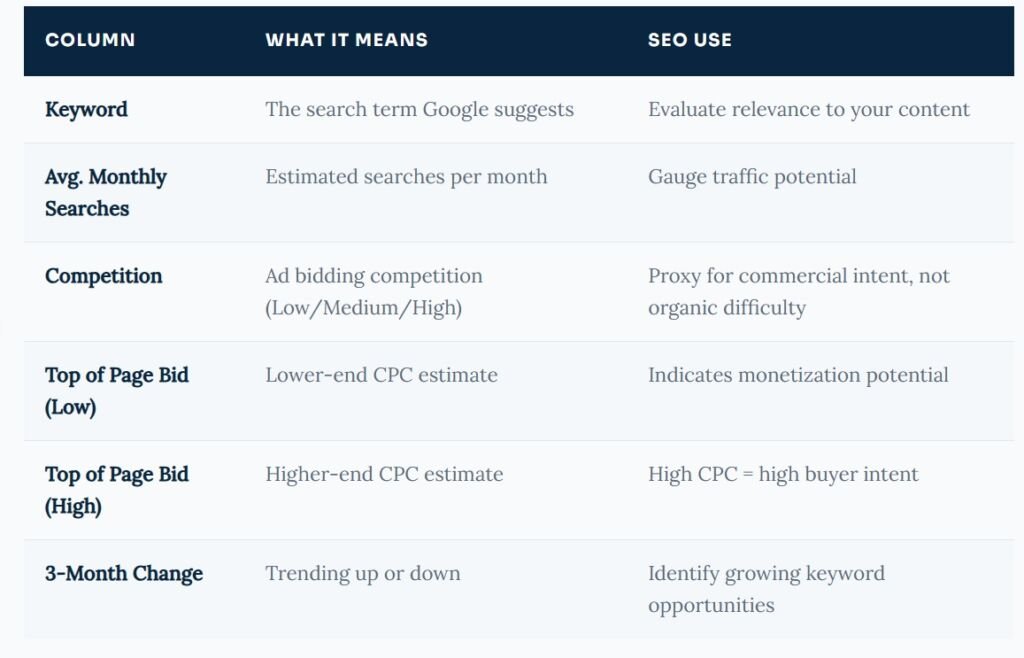
Many beginners use the "Competition" column in the Google Ads Keyword Planner to judge how hard a keyword is to rank for organically. This is wrong. The competition column only reflects how many advertisers are bidding on that term — not how hard it is to rank in organic search results.
Common Mistakes to Avoid
4. Filter Smarter, Not Harder
The real power of the Google Keyword Planner tool’s free version lies in its filtering system. Use “Add Filter” to narrow down thousands of keyword ideas to the ones that actually matter for your strategy:
- Avg. Monthly Searches: Set a minimum (e.g., 100/month) to eliminate irrelevant, near-zero traffic keywords.
- Keyword Text: Include or exclude specific words. Perfect for building topic-specific lists.
- Top of Page Bid: Filter for a minimum CPC to find keywords with commercial intent.
- Organic Impression Share: Connect your Google Search Console and see which keywords you’re already appearing for — so you can double down.
5. Export and Organise Your Keyword List
Once you’ve filtered your results, download your keyword list as a CSV. Inside The SEO Byte workflow, we then organise keywords into three buckets:
- Pillar keywords — high volume, broad terms that anchor major content pieces
- Cluster keywords — medium-volume, specific terms that support the pillar topic
- Long-tail keywords — low-volume, highly specific queries with strong conversion potential
📥 Need help organizing your keywords into a content strategy? Talk to The SEO Byte team today.
Advanced Tips: Using Google Keyword Planner for SEO
Most people barely scratch the surface of what this tool can do. Here are advanced strategies we use when leveraging Google Keyword Planner for seo at scale.
Tip 1: Use a Competitor's URL to Steal Their Keywords
In the “Start with a Website” option, enter a competitor’s high-ranking article URL. The Google keyword planner tool will reverse-engineer the keywords that page is likely targeting — giving you a shortcut to understanding their content strategy.
Tip 2: Find "Content Gap" Keywords
Enter multiple competitor URLs one by one and note the keywords that keep appearing. These are the topics your niche values — and if you’re not covering them, you’re leaving traffic on the table.
Tip 3: Use Bid Data to Prioritize Commercial Pages
When doing a Google keyword search for a product or service category, sort by “Top of Page Bid (High).” Keywords with high bids mean advertisers are paying a premium to be visible there — a clear sign that searchers in those results have buying intent. These are the Google keywords worth prioritizing for your landing pages and service pages.
Tip 4: Track Seasonal Trends
Click on any keyword, and the keyword planner will show you a monthly breakdown chart. Use this to plan seasonal content ahead of time. For example, if “diwali gift ideas” spikes in October, you want your content live at least 6–8 weeks before that — not in October.
Tip 5: Build Negative Keyword Lists
Even for SEO purposes, identifying keywords you DON’T want to rank for helps you write sharper, more focused content. Use the AdWords Keyword Planner to spot irrelevant terms that might be pulling your content in the wrong direction.
Local SEO with Google Keyword Planner
If your business serves a specific city or region — say, an SEO agency in Agra, a dental clinic in Pune, or a clothing boutique in Ahmedabad — the Google keyword planner tool is one of your most powerful local SEO assets.
Here’s how to use it for local keyword discovery:
- Set your location to your specific city or state — not just “India.”
- Add location modifiers to your seed keywords: “plumber in Jaipur,” “digital marketing agency in Agra,” and “best CA near Andheri.”
- Use the Google keyword search data to find the exact phrasing your local audience uses — “near me” queries, area names, landmark-based queries.
- Look at the seasonal chart for local events and festivals that might create demand spikes (Navratri in Gujarat, Puja season in Kolkata, etc.).
Local keywords tend to have lower search volumes but significantly higher conversion rates. A search for "best chartered accountant in Pune" has much higher buying intent than a generic search for "accountant." Use the Google Ads Keyword Planner to identify these hyper-local, high-intent gems before your competitors do.
Local SEO Insight
Google Keyword Planner vs Other Keyword Tools
How does the Google keyword planner tool free stack up against paid alternatives? Here’s an honest comparison:
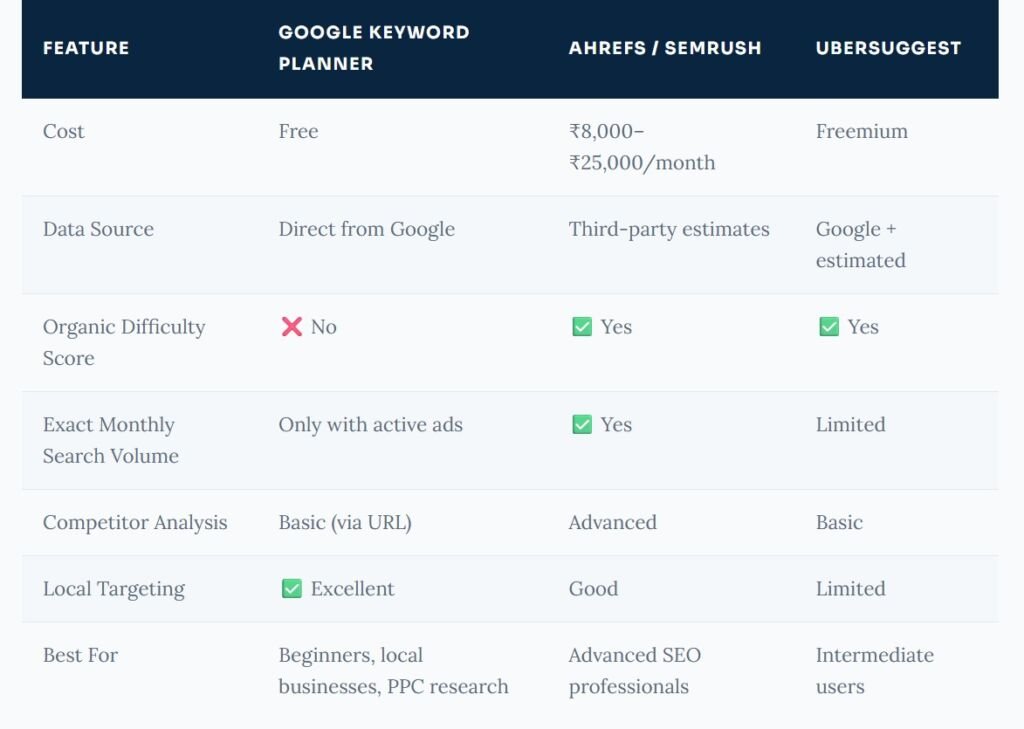
Use the Google Keyword Planner as your starting point. It's free, reliable, and directly Google-sourced. Pair it with Google Search Console (also free), and you have a solid keyword research stack — no monthly subscription required. If you're ready to go deeper, premium tools add value — but they're not necessary to get meaningful results, especially if you're a small business or just getting started with Google Keyword Planner for seo.
The SEO Byte's take
Ready to Rank? Let The SEO Byte Do the Heavy Lifting.
Our SEO team builds keyword strategies that drive real organic traffic — from local businesses to national e-commerce brands across India.
What People Are Asking About Google Keyword Planner
Is Google Keyword Planner completely free to use?
Yes. The Google Keyword Planner tool free access to anyone with a Google Ads account — no active campaign or credit card required. The only limitation is that without active spending, you see volume ranges instead of exact numbers.
Can I use Google Keyword Planner for SEO (not just paid ads)?
Absolutely. Despite being part of Google Ads, the keyword planner is one of the most widely used tools for organic SEO. It helps you discover search demand, identify content gaps, and build keyword-driven content strategies. Just remember: the “Competition” metric reflects ad competition, not organic ranking difficulty.
How accurate is Google Keyword Planner search volume data?
The Google keyword search volume data is sourced directly from Google, making it highly reliable. However, without an active ad campaign, volumes are shown as ranges. For the most accurate data, either run a small test campaign or cross-reference with Google Search Console data for your own domain.
What is the difference between the AdWords Keyword Planner and the Google Keyword Planner?
They are the same tool. “AdWords Keyword Planner” is the older name — when Google rebranded Google AdWords to Google Ads in 2018, the tool was renamed the Google Ads Keyword Planner. The functionality is essentially the same, though the interface has been updated over the years.
How do I find low-competition keywords using the Google Keyword Planner?
Use the filter options in the Google Keyword Planner tool to set a maximum on average monthly searches (e.g., under 5,000) combined with a minimum CPC. This tends to surface long-tail, niche-specific terms with lower organic competition. Combine this with a keyword difficulty tool for best results.
Does Google Keyword Planner show local keyword data?
Yes — and this is one of the Google Keyword Planner tool’s strongest features. You can target by country, state, or city. This is especially valuable for local businesses in India looking to rank for city-specific searches like “web design agency in Surat” or “SEO consultant in Lucknow.”
How many keywords can Google Keyword Planner generate?
A single Google keyword search in the Discover New Keywords tool can return up to 2,000 keyword ideas. By entering multiple seed keywords at once and using the website URL feature, you can dramatically expand this list and uncover thousands of relevant Google keywords for your niche.
What are LSI keywords, and can Keyword Planner help find them?
LSI (Latent Semantic Indexing) keywords are conceptually related terms that help search engines understand the full context of your content. The Google Keyword Planner naturally surfaces many of these through its keyword ideas list — you’ll find synonyms, related phrases, and contextual variations that strengthen your content’s semantic relevance for both Google and AI-powered search.
Can I use Google Keyword Planner to find keywords for YouTube or voice search?
While the Google Ads keyword planner is focused on Google Search data, many of the keywords it surfaces reflect how people naturally phrase their queries — including conversational, voice-search-style queries. For YouTube specifically, Google Trends and YouTube’s own search suggest feature provide more targeted data.
Is there a better free alternative to Google Keyword Planner?
For pure Google keyword search volume data, nothing beats the Google Keyword Planner — it’s the primary source. Other free tools like Google Trends, Google Search Console, and Answer The Public complement it well. Paid tools like Ahrefs and Semrush offer richer organic SEO data but come at a cost.
The SEO Byte team works with businesses across India — from startups in Bengaluru to e-commerce brands in Mumbai — to build keyword strategies that generate real, measurable organic traffic.
Stop Guessing. Start Ranking.
The Bottom Line on Google Keyword Planner
The Google Keyword Planner is one of the most underrated tools in the SEO world — and the fact that it’s free makes it even more remarkable. When you learn to use the Google Keyword Planner for SEO the right way, you gain access to the same data Google uses to understand search intent, search volume, and competitive demand.
Here’s a quick recap of what we covered:
- The Google Keyword Planner tool free is accessible to anyone with a Google Ads account
- Use “Discover New Keywords” to build your initial keyword list
- Set your location to match your actual target audience — especially for local SEO
- Don’t confuse “Competition” in the Google Ads keyword planner with organic ranking difficulty
- Use Top of Page Bid data to identify commercially valuable Google keywords
- Export your keyword list, organise it into content clusters, and build a publishing strategy
Whether you’re doing your own research or looking for expert guidance, the keyword planner is your starting point — and The SEO Byte, the best digital marketing agency in Agra is here to help you turn that research into rankings.
Ready to turn your Google Keyword Planner data into a full-scale SEO strategy?

1 Comment